As a Bol.com seller using Moneybird as your accounting software, you have several options for automatically synchronizing your orders. The two most well-known solutions are Webwinkelfacturen.nl and Schakel. But which one should you choose? In this article, we provide an honest, detailed comparison so you can make the best decision for your situation.
Overview of Both Platforms
Webwinkelfacturen.nl
Webwinkelfacturen.nl is an established name in the Dutch e-commerce market. The platform offers integrations between various webshop platforms and accounting packages. The Bol.com-to-Moneybird connection is one of their many integrations.
Schakel
Schakel was built specifically for the connection between Bol.com and Moneybird. Rather than a generic solution supporting dozens of platforms, Schakel focuses exclusively on perfecting this single integration. This results in deeper integration and more Bol.com-specific features.
The Comparison: Feature by Feature
Synchronization Speed
One of the biggest differences between the two platforms is synchronization speed.
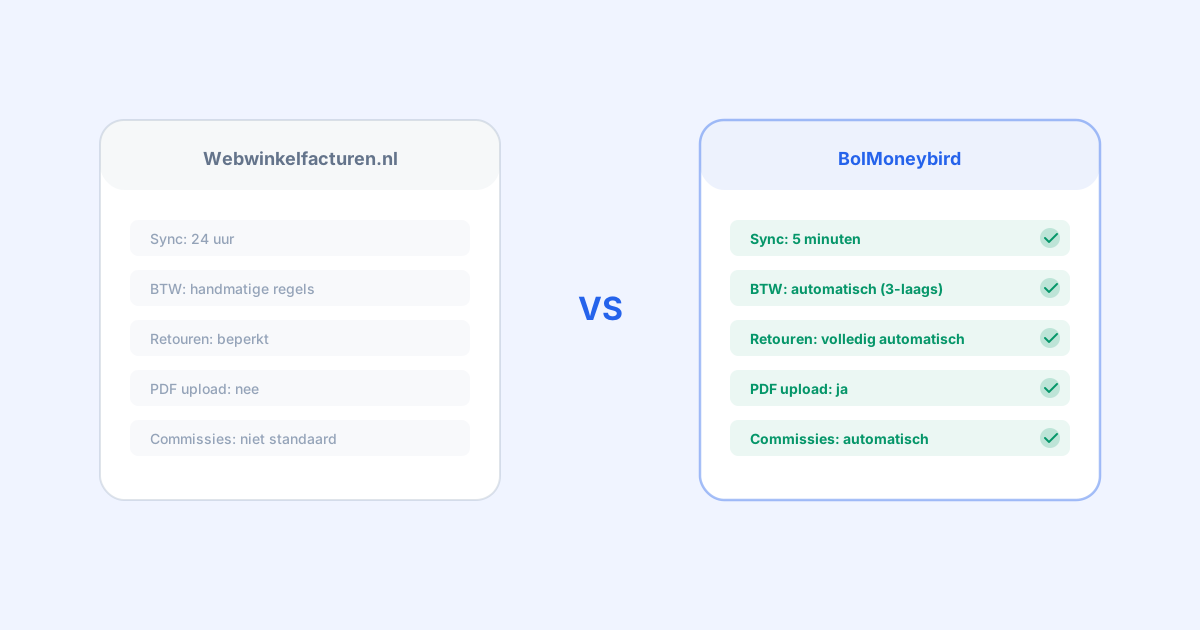
Webwinkelfacturen.nl typically synchronizes orders once every 24 hours. This means an order that comes in during the morning will not appear in your Moneybird administration until the next day.
Schakel synchronizes every 5 minutes. New orders, returns, and invoices are processed almost immediately. This gives you real-time insight into your financial situation.
Winner: Schakel: 5 minutes vs 24 hours is a significant difference, especially if you want up-to-date insight into your accounting.
VAT Mapping
Correctly assigning VAT rates is crucial. The Netherlands has three rates (21%, 9%, 0%), and applying the wrong rate can lead to problems with the Tax Authority.
Webwinkelfacturen.nl offers a basic option to set a default VAT rate. For non-standard rates, you need to manually create rules per product category.
Schakel uses a three-layered system:
- EAN match: Automatic recognition based on the product’s EAN number
- Title match: Analysis of the product title to determine the category
- Default rate: Falls back to your configured default rate
This means Schakel applies the correct VAT rate in most cases without any manual configuration.
Winner: Schakel: The automatic three-layered system is a clear step forward compared to manual rule configuration.
Processing Returns
Returns are a significant part of selling on Bol.com. On average, 15-30% of products are returned, depending on the category.
Webwinkelfacturen.nl processes returns, but the implementation is more limited. You often need to manually verify that credit invoices have been created correctly.
Schakel automatically detects returns and immediately creates a credit invoice linked to the original sales invoice. The credit invoice contains the exact same details (product, amount, VAT rate) as the original invoice, but as a correction.
Winner: Schakel: Fully automatic return processing with correct credit invoice linking.
Recording Bol.com Commissions
Bol.com charges a commission on every product sold. These commissions need to appear as expenses in your accounting.
Webwinkelfacturen.nl does not record commissions as separate expense items by default. You need to do this manually or configure it through workarounds.
Schakel automatically creates purchase invoices for every Bol.com commission. In addition, the monthly Bol.com invoices (with the overview of all commissions) are automatically imported, including the CSV specification as individual line items and the original PDF as an attachment.
Winner: Schakel: Automatically recording commissions as expenses is a unique and valuable feature.
Bol.com Invoices with PDF Upload
Every month, Bol.com sends an invoice with an overview of all charges (commissions, shipping costs, etc.).
Webwinkelfacturen.nl does not import these invoices automatically. You need to manually download them and enter them into Moneybird.
Schakel automatically downloads the monthly Bol.com invoices, creates purchase invoices in Moneybird with detailed line items, and uploads the original PDF as an attachment. This is a unique feature that saves you significant manual work.
Winner: Schakel: PDF upload of Bol.com invoices is an exclusive feature.
User Interface
Webwinkelfacturen.nl has a functional but dated interface. Settings are spread across multiple pages, and it can take some time before you have everything configured.
Schakel has a modern, clean interface built with the latest web technologies. The dashboard immediately shows synchronization status, recent orders, and any errors. Settings are logically grouped and clearly explained.
Winner: Schakel: More modern, more intuitive interface.
Comparison Table
| Feature | Webwinkelfacturen.nl | Schakel |
|---|---|---|
| Sync interval | 24 hours | 5 minutes |
| VAT mapping | Manual rules | Automatic (EAN/title/default) |
| Returns as credit invoices | Limited | Fully automatic |
| Commissions as expenses | Not by default | Automatic |
| Bol.com invoice PDF upload | No | Yes |
| FBB support | Basic | Full (FBR + FBB) |
| Belgian orders | Yes | Yes (incl. VAT handling) |
| Number of supported platforms | 50+ | Bol.com + Moneybird only |
| API-based | Yes | Yes (Bol.com v10 API) |
| Support | Email + chat | |
| Free trial | Yes | Yes |
When Should You Choose Webwinkelfacturen.nl?
Webwinkelfacturen.nl may be the better choice if:
- You have multiple sales channels besides Bol.com (Shopify, WooCommerce, Amazon) and want to manage everything through a single platform
- You use an accounting package other than Moneybird (Exact Online, Snelstart, e-Boekhouden)
- You have a low order volume and do not need Schakel’s advanced features
When Should You Choose Schakel?
Schakel is the better choice if:
- You primarily sell via Bol.com and use Moneybird as your accounting software
- You value real-time synchronization (every 5 minutes)
- You sell products with different VAT rates and want automatic VAT mapping
- You want returns automatically processed as credit invoices
- You want Bol.com commissions automatically recorded as expenses
- You want the monthly Bol.com invoices automatically imported with PDF
- You consider a modern, user-friendly interface important
What Do Users Say?
We regularly hear from sellers who have switched from Webwinkelfacturen.nl to Schakel. The most commonly cited reasons:
- “The 5-minute sync is a game changer. I no longer have to wait until the next day to see if everything is correct.”
- “Finally, my returns are automatically processed correctly. That saves me at least an hour per week.”
- “The automatic VAT mapping saves me so much stress. I no longer have to check the rate for every product.”
- “The automatic import of the Bol.com monthly invoices with PDF, I wish I had that much sooner.”
Making the Switch
Considering switching from Webwinkelfacturen.nl to Schakel? The process is straightforward:
- Create a Schakel account: this takes just a few minutes
- Connect your Bol.com and Moneybird accounts: through secure OAuth connections
- Configure your settings: choose your ledger accounts, VAT settings, and return processing
- Start the sync: Schakel immediately begins processing your orders
- Cancel Webwinkelfacturen.nl: once you have verified that everything works correctly
There is no overlap needed: Schakel picks up from the moment you start and does not process orders that have already been handled by Webwinkelfacturen.nl.
Conclusion
Both platforms have their place in the market. Webwinkelfacturen.nl is a solid choice for sellers who use multiple channels and accounting packages. But if you specifically combine Bol.com and Moneybird and want the best, most complete, and fastest synchronization, Schakel is the clear winner. The combination of 5-minute sync, automatic VAT mapping, full return processing, and Bol.com invoice import makes it the most advanced Bol.com-Moneybird integration on the market. Start your free trial and experience the difference for yourself.
Use Exact Online instead of Moneybird? Read connecting a webshop to Exact Online: options, costs and pitfalls.
Want this handled automatically? Pick your connector.
Back to the blog