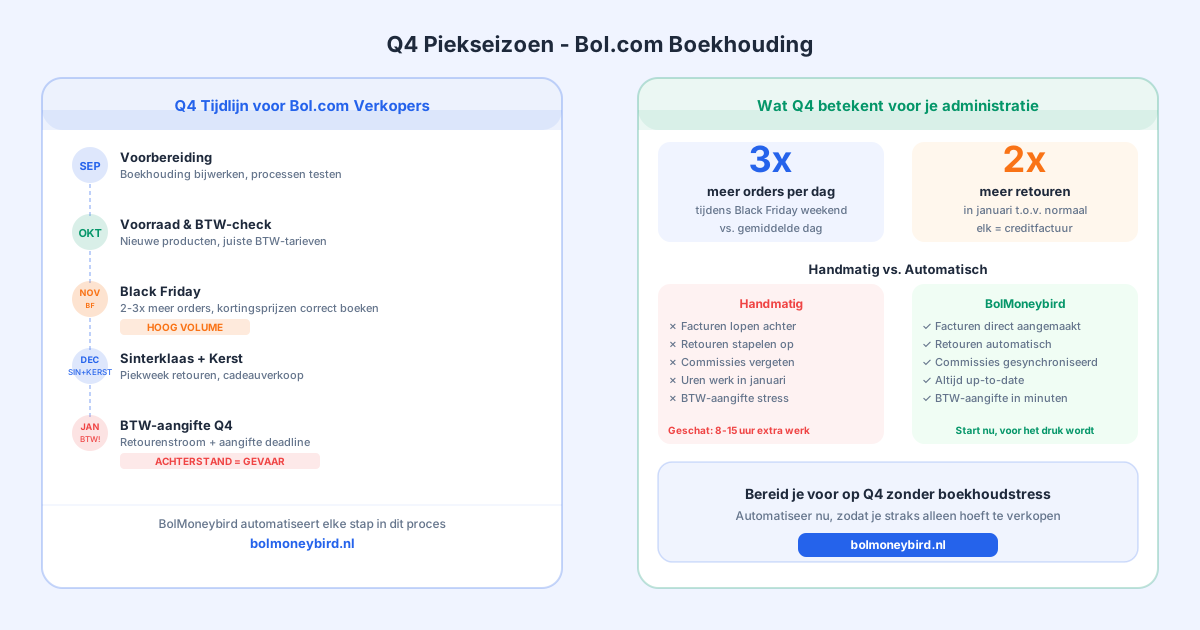
It’s August. For many Bol.com sellers, this is when the mental preparation for the busiest three months of the year begins. Black Friday at the end of November, Sinterklaas in early December, then Christmas and the holiday season. During Q4, sellers can process two to three times more orders per day than usual. That’s great for revenue, but it puts enormous pressure on everything surrounding the business, including your bookkeeping.
In this article, we look at what Q4 means for your administration, which pitfalls to watch out for, and how to make sure you don’t end the year buried under a backlog of unprocessed transactions.
Why Q4 puts your bookkeeping under pressure
During normal months, Bol.com sellers have a manageable rhythm. Weekly payouts, a predictable number of orders, and enough breathing room to verify everything is correct. In Q4, that rhythm disappears.
During Black Friday weekend, some sellers receive more orders in a single day than they normally do in a week. Every one of those orders needs an invoice with the correct VAT rate, the right date, and accurate customer details. Returns increase, because customers send back gifts that didn’t fit or weren’t quite right. Bol.com’s payout timing may shift, or you’ll see payout amounts that are significantly larger than usual because several peak days fall within a single payment period.
If you’re tracking all of this manually, there’s a real risk you’ll enter January with a backlog. And trying to catch up while simultaneously preparing your Q4 VAT return is not a good way to start the new year.
Common bookkeeping mistakes in Q4
Invoicing too late. Sellers who manually create invoices often can’t keep up during busy periods. Orders from November get invoiced in December or January. This creates confusion during reconciliation and can affect your VAT return, because the invoice belongs in the quarter of delivery, not the quarter in which you created it.
Not processing returns promptly. Returns spike significantly in Q4. Customers return Christmas gifts that didn’t work out, products that arrived damaged, or duplicate orders. Each return requires a credit note. If you delay processing them, they pile up and the January reconciliation becomes a major headache.
Misassigning payouts. Bol.com pays out weekly, but in Q4 the amounts can vary dramatically. A payout following Black Friday might be ten times your typical weekly amount. When manually matching, the chance of assignment errors is higher than usual.
Losing track of commission invoices. Bol.com sends a monthly commission overview. In November and December, those amounts are much higher. If you manually book commissions and miss one month, your profit and loss statement will be off.
How to make your administration Q4-ready
Start now, not in November. The best preparation for Q4 is having your bookkeeping in order before the peak season starts. That means checking whether all transactions from recent months are correctly processed, closing any backlogs now, and making sure your processes work well before things get busy.
Automate as much as possible. During a period when your time is needed for purchasing, inventory management, customer service, and shipping, you don’t want to spend hours manually creating invoices. Every quarter-hour spent on bookkeeping is a quarter-hour you’re not spending running your business.
Keep your VAT rates accurate. If you’re adding new products to your range for Q4, verify the correct VAT rate right away. Gift items, children’s toys, books, and some food products carry different rates than standard products. A VAT rate error needs to be corrected later, and that’s extra work you don’t need.
Do interim checks. Don’t wait until January to verify everything is correct. Schedule a brief check halfway through November (before Black Friday) and another one halfway through December (before Sinterklaas). This way you catch errors while they’re still manageable.
Black Friday: the busiest bookkeeping moment of the year
Black Friday deserves special attention. Not just because it’s the busiest sales day, but because sellers run promotions that require extra care bookkeeping-wise. Discounts, bundle deals, free shipping above a threshold: all of these affect your average order value and therefore your commission calculation.
Bol.com calculates commission on the actual selling price, including discounts. If you’re selling a product that normally costs €49.99 for €34.99, you pay commission on €34.99. But if your bookings are based on the normal price, your administration won’t be accurate.
After Black Friday, always verify that booked revenue matches the actual selling prices from that period. Our article on booking commissions in Moneybird explains how to handle this correctly.
Sinterklaas and Christmas: the returns problem
The period after Sinterklaas and Christmas is the busiest returns period of the year. Customers send back gifts that were the wrong size, already owned, or simply not wanted. For many categories, the return rate in January can be twice the normal level.
Every return needs to be processed as a credit note in your bookkeeping. If you have a hundred returns in January, that means a hundred credit notes to create. Manually, that’s an enormous job, and the chance of errors increases as the pile grows.
Make sure you have a workflow that handles returns quickly and accurately. With high return volumes, it’s also worth considering whether you need to set aside a return reserve so your cash flow isn’t caught off guard by a large wave of returns.
How Schakel handles Q4
Schakel automatically synchronises your Bol.com account with Moneybird. Every order that comes in is immediately created as a sales invoice with the correct VAT rate, the right customer details, and the correct date. Whether you receive ten orders a day or a thousand: the bookkeeping keeps up automatically without any extra effort on your part.
Returns are automatically processed as credit notes as soon as Bol.com confirms them. Commissions are correctly booked each month. And payout reconciliation goes considerably faster because all the underlying invoices are already in Moneybird.
In Q4, this means concretely: the busier things get, the more value automation delivers. While you’re busy packing parcels, Schakel is processing your bookkeeping in the background.
Get started before it’s too late
The best time to automate your Bol.com bookkeeping is now, in the middle of the year, when things are still calm enough to set everything up properly. Q4 is not a good time to learn a new tool.
Make sure your setup is correct, your Moneybird categories are properly configured, and you’ve tested that synchronisation works as expected. Then you can enter Q4 confident that your bookkeeping is in order, whatever happens.
Try Schakel for free and get your bookkeeping ready for the busiest season of the year.
Want this handled automatically? Pick your connector.
Back to the blog